Marketplace Guide
Discover, browse, and use AI workflows from the Hydra community.
Overview
The Hydra Marketplace is a central hub where you can:
- Browse community-created workflows by category
- Search for specific workflow types or use cases
- Fork workflows to customize for your needs
- Subscribe to workflows for automatic updates
- Rate and review workflows you've used
Accessing the Marketplace
Visit hydra.opiusai.com/marketplace (opens in a new tab) or click Marketplace in the navigation bar.
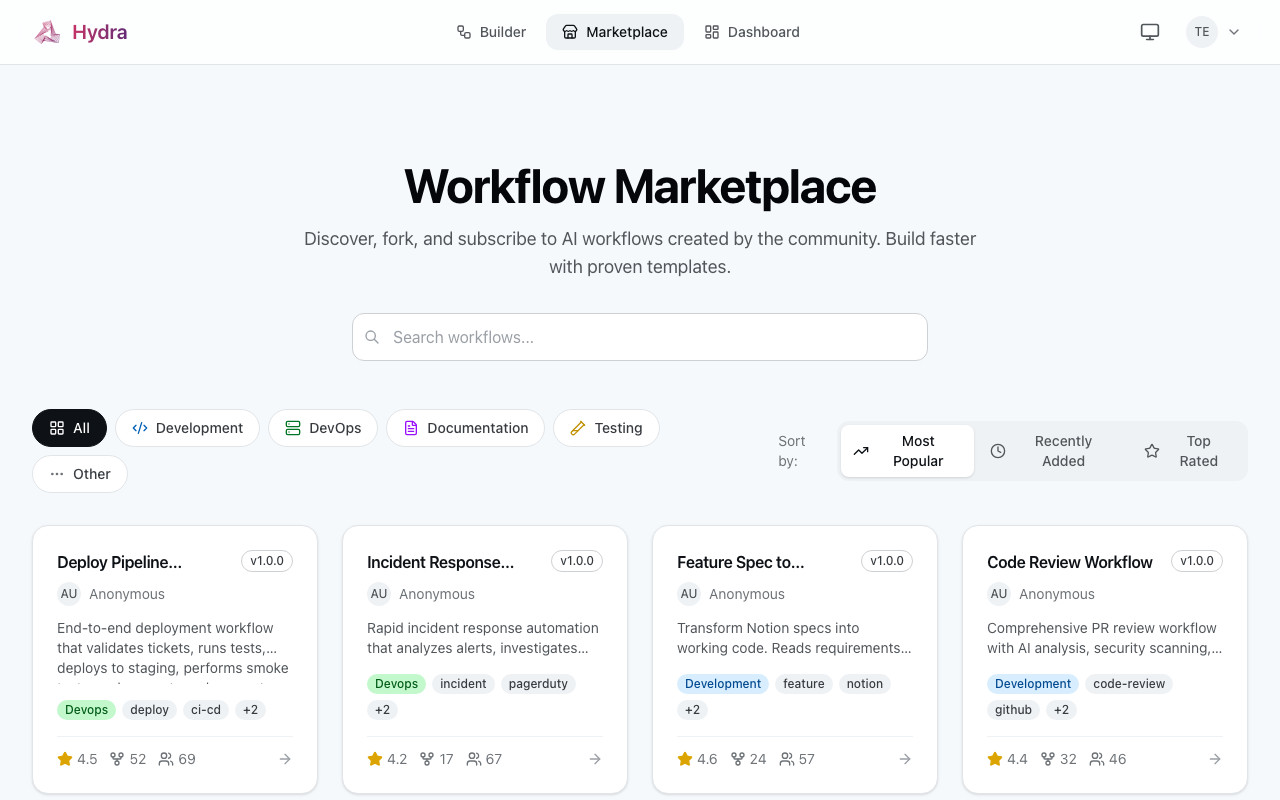
Browsing Workflows
Categories
Workflows are organized into categories:
| Category | Description | Examples |
|---|---|---|
| Development | Code writing and editing | Bug fixes, refactoring |
| DevOps | Infrastructure and deployment | CI/CD, monitoring |
| Testing | Test generation and validation | Unit tests, E2E tests |
| Documentation | Doc generation and updates | API docs, README |
| Security | Security analysis and fixes | Vulnerability scans |
| Code Review | PR and code review workflows | Style checks, quality |
Sorting Options
- Most Popular - By fork and subscription count
- Recently Added - Newest workflows first
- Top Rated - Highest community ratings
Featured Workflows
The homepage displays hand-picked featured workflows that demonstrate best practices and solve common problems.
Searching
Use the search bar to find workflows by:
- Name - Workflow title
- Intent - What the workflow accomplishes
- Tags - Keywords added by authors
- Author - Workflow creator
Search Tips
"bug fix" typescript     # Exact phrase + keyword
security audit           # Multiple keywords
@alice                   # By author (coming soon)
Workflow Detail Page
Click any workflow to see:
Overview Tab
- Description - Full markdown description
- Intent - What the workflow does
- Author info - Creator and their other workflows
- Stats - Forks, subscribers, rating
Steps Tab
View the workflow structure:
1. Analyze Code → 2. Identify Issues → 3. Generate FixEach step shows:
- Action type
- Dependencies
- Parameters
Versions Tab
- Version history with changelogs
- Breaking change indicators
- Release dates
Reviews Tab
Community ratings and feedback from users who've tried the workflow.
Using a Workflow
Fork
Create your own copy to customize:
- Click Fork on the workflow page
- Name your forked copy
- Find it in your Dashboard
- Edit as needed
See Forking & Subscribing for details.
Subscribe
Use without creating a copy:
- Click Subscribe
- Choose version pinning strategy
- Add to your deployment
Subscribing requires a Hydra account. Sign up or log in to subscribe to workflows.
Authentication
Some features require authentication:
| Feature | Logged Out | Logged In |
|---|---|---|
| Browse | ✅ | ✅ |
| Search | ✅ | ✅ |
| View Details | ✅ | ✅ |
| Fork | ❌ | ✅ |
| Subscribe | ❌ | ✅ |
| Rate/Review | ❌ | ✅ |
Rating Workflows
Help the community by rating workflows you've used:
- Use the workflow in your IDE
- Return to the workflow page
- Click Rate
- Select 1-5 stars
- Optionally add a written review
Rating Guidelines
- ⭐ Did not work at all
- ⭐⭐ Partially worked, major issues
- ⭐⭐⭐ Works but needs improvement
- ⭐⭐⭐⭐ Works well, minor issues
- ⭐⭐⭐⭐⭐ Excellent, highly recommend
Tips for Finding Good Workflows
- Check ratings - Look for 4+ star workflows
- Read reviews - See what others experienced
- Check recent activity - Active maintainers update regularly
- Review the steps - Make sure it does what you need
- Start with featured - These are vetted for quality
Keyboard Shortcuts
| Key | Action |
|---|---|
/ | Focus search |
Esc | Close modal |
Enter | Submit search |
Mobile Access
The marketplace is fully responsive and works on mobile devices. Perfect for browsing workflows on the go.
Next Steps
- Learn about Publishing Workflows
- Understand Forking & Subscribing
- Explore Example Workflows